Why You Need a Reliable World Time Zone Converter in 2026
In our hyper-connected world, knowing the exact current time in different cities is no longer optional — it's essential. Whether you're coordinating with a remote team across continents, planning a family call with relatives in another country, booking international flights, or simply avoiding awkward 3 AM meetings, a fast and accurate world clock tool saves hours every week.
The Snoopbee World Time Zone Converter is completely free, requires no download or registration, and works instantly in your browser on any device — desktop, tablet, or mobile. Updated for 2026 with automatic Daylight Saving Time (DST) handling, it supports over 100 major cities and time zones.
Key Features of Snoopbee World Time Zone Converter
Our tool stands out with its clean interface and powerful functionality tailored for real-world use:
| Feature | Description | Benefit |
|---|---|---|
| Live Multi-City Clocks | Simultaneous display of current time in your selected cities | At-a-glance comparison without refreshing |
| Time Zone Search & Converter | Search by city name or country and convert any specific date/time | Perfect for meeting scheduling |
| Automatic DST Adjustment | Handles daylight saving changes in USA, Europe, Australia, etc. | Always accurate year-round |
| Mobile-Friendly Design | Fully responsive layout optimized for phones and tablets | Use on the go while traveling |
| UTC & GMT Reference | Built-in Coordinated Universal Time display | Essential for developers and global teams |
Lightning-fast loading, no registration required, and privacy-first design. Works on any device — desktop, tablet, or mobile — with automatic DST updates year-round.
How to Use the World Time Zone Converter Step-by-Step
Getting started takes seconds:
- Open https://snoopbee.com/WorldClock/ in any browser.
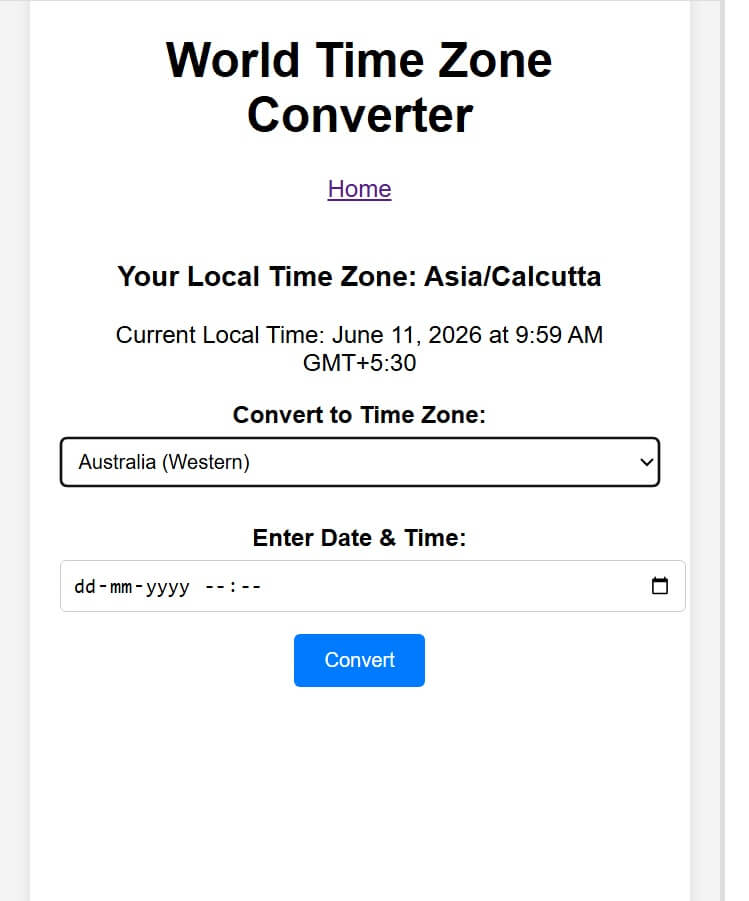
- Your local time zone (e.g., Asia/Calcutta or America/New_York) is automatically detected and displayed.
- Use the dropdown to add major cities like New York, London, Sydney, Tokyo, São Paulo, or Mexico City.
- Enter a specific date and time in the converter section to see equivalents across zones.
- Bookmark the page or add cities you use frequently for instant access.
Popular Time Zones Covered
The tool includes all major regions:
- North America: New York (EST/EDT), Los Angeles (PST/PDT), Chicago, Toronto, Mexico City
- South America: São Paulo (BRT), Buenos Aires, Bogotá
- Europe: London (GMT/BST), Paris (CET/CEST), Berlin, Moscow
- Asia & Oceania: Tokyo, Beijing, Singapore, Sydney (AEST), Dubai
- Others: UTC, GMT, IST (India), and many more
Best Use Cases for the World Clock Tool
1. Remote Work & Global Teams
With distributed teams becoming the norm in 2026, overlapping working hours are critical. Use the converter to find the best time for stand-ups between San Francisco, London, and Bangalore teams.
2. International Travel Planning
Check flight arrival times, hotel check-in hours, and local business operating times before your trip to Australia, Europe, or Latin America.
3. Stock Market & Trading Hours
Track when major exchanges open and close: NYSE (New York), LSE (London), TSE (Tokyo), and B3 (Brazil).
4. Family & Friends Across Borders
Never call your parents in Mexico at 4 AM again. Schedule calls perfectly every time.
Need Accurate Global Times Right Now?
Try the free tool instantly — no sign-up required.
🌍 Open World Time Zone Converter →Pro Tips for Maximum Productivity with World Clocks
- Pin Your Core Cities: Add your home city + team locations + client hubs for permanent dashboard view.
- Use for Meeting Scheduling: Always propose times in the other person's local zone to show respect.
- Account for DST Transitions: The tool automatically updates, but double-check around March/November in Northern Hemisphere.
- Mobile Shortcut: Add to home screen on your phone for one-tap access during travel.
- Combine with Calendar Apps: Cross-reference with Google Calendar world clock widgets.
- Track Sleep Schedules: Remote workers in different zones can optimize call times to respect everyone's rest.
Users in USA/Canada love comparing EST/PST with Europe. Australians benefit from Sydney vs. European morning overlap. Latin American users frequently check against US and European markets.
Frequently Asked Questions
Is the World Time Zone Converter free?
Yes, 100% free forever with no ads in the tool interface.
Does it handle Daylight Saving Time automatically?
Yes, the clocks update in real-time with current DST rules for all supported zones.
Can I convert a future date and time?
Absolutely. Use the date/time picker to see what time it will be in any city.
Is it accurate for China, India, and Australia?
Yes — including single time zone countries like China and India, and Australia's multiple zones.
Does it work offline?
Live clocks require internet for initial load and occasional sync, but conversion math works offline.
How many cities can I add?
Unlimited for practical use. The interface remains clean even with 10+ clocks.
Ready to Master Global Time?
Free, no download, no registration — play directly in your browser on any device.
🌍 Use World Time Zone Converter Now